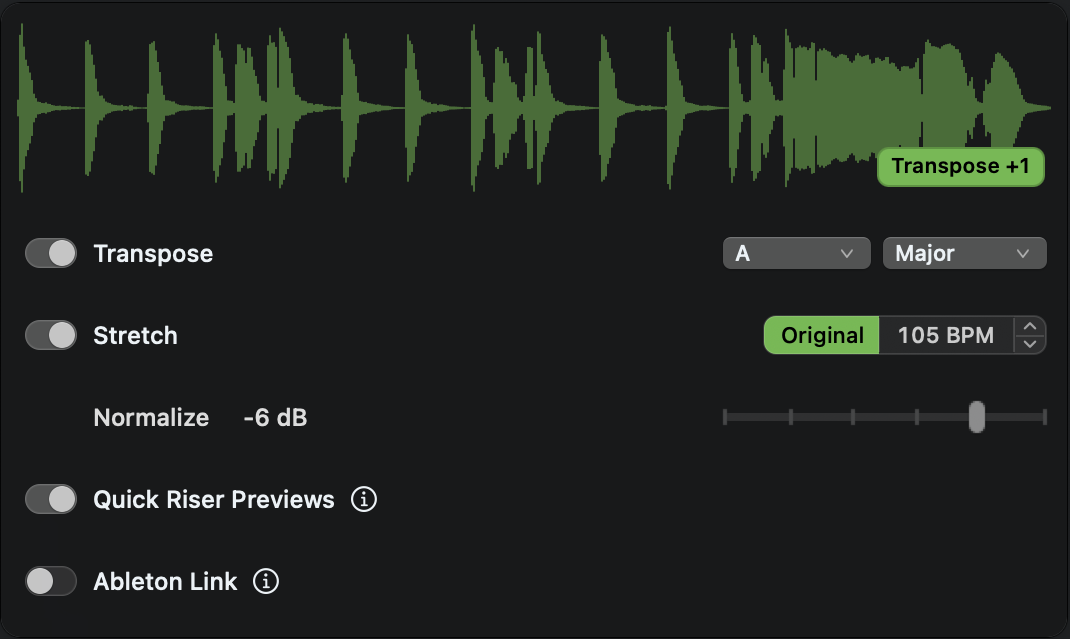
AddedTranspose octave control: click the Transpose badge to choose the matching pitch above or below the source.
ImprovedNormalize is easier to scan at the top of the controls, with its target level shown inline.
FixedManual Transposition keeps its mode and semitone amount when switching files.
FixedDetailed Waveform regenerates the waveform for the selected sample.
Fixedthe enabled Loop control stays available after a Transpose change.
Fixedthe waveform keeps its height when switching samples while controls are opening or closing.
Version 1.4
This major update adds time-stretching, auto-transpose to your song key, Live Link and more, letting you preview samples in-pitch and in-time while you write.
AddedKey Transposition
Automatically transpose samples with a key in their filename to your song's key.
AddedTempo Stretching
Keep a sample's original timing while transposing, or preview loops at your chosen BPM.
AddedAbleton Link Sync
Play samples along with your Ableton Live sessions from either Finder or Stashes, the same as if you were in Live’s browser, but with the additional features of FAT.
AddedLoop Mode
When enabled, loop any audio that is at least 2.5 seconds long.
AddedPreview Seeking
Press Control+Left or Control+Right to jump backward or forward four seconds.
AddedManual Transposition
Press Control+Up or Control+Down to shift the current sample one semitone at a time.
AddedPlay Original
Press Option+Right to hear the selected file once without transposing, stretching, Link sync, or Quick Riser processing (normalization stays active).
Improvedthe waveform panel now follows your macOS accent color.
Improvedthe Stashes window received a visual polish.
Smaller performance enhancements and fixes.
We hope you enjoy this update, please share your thoughts online or at [email protected].
Note: after updating, Waveform View will be enabled by default, as is now the recommended way to use FAT. You can turn it back off in the menu tray.
Version 1.3.9
Improvedarrowing through a big folder is responsive right away instead of after the whole folder finishes loading.
Fixedthe first file in a folder now plays reliably when you move through Finder quickly.
Fixedselecting a different file with Autoplay off stops the current preview.
FixedShift+Left again moves the selected audio or MIDI file to the Trash when Autoplay is off.
Version 1.3.8
Improvedclearing the Finder selection now stops playback, while switching tabs keeps the current preview playing until a new selection is made.
Improvedwaveform contrast in dark and light modes.
Improvedletter shortcuts now follow alternative keyboard layouts such as French AZERTY.
Fixedkeyboard shortcuts no longer interfere while renaming files in Finder.
FixedFinder tag cycling now preserves custom tag names, colors, order, and duplicates.
Fixedselecting the same file again after stopping playback now starts a fresh preview.
FixedFinder Audio Tools now stays responsive when Finder is busy.
Version 1.3.7
Fixedplayback issue in List View when browsing nested folders
Version 1.3.6
Improvedonboarding screen visibility.
Improveddiagnostic logging and usage reporting.
Fixeda rare hang while detecting Finder's view mode.
Version 1.3.5
AddedREAPER project previews: play RPP-PROX files directly, or select an RPP project to play its existing proxy.
Improvedkeyboard monitoring efficiency.
Version 1.3.4
Improvedcompatibility with macOS Golden Gate.
Fixedaudio output now follows the stereo channel pair set in Audio MIDI Setup.
Two small playback stability improvements.
Version 1.3.3
Improvedcompatibility with files larger than your selected RAM Cache Size.
Waveforms and Auto-Normalization may need a quick calculation before playback starts.
Improvedchangelog readability and made it prettier.
Smaller performance enhancements and edge case fixes.
Version 1.3.2
ImprovedAggregate audio devices now play through their first output channels.
Version 1.3.1
AddedCtrl+F now adds the current Finder selection to the visible Stash.
AddedCmd+F now focuses the Stashes search field.
ImprovedWhen adding files to a Stash, duplicate files are now skipped.
Several Stash workflow, performance, and visual improvements.
Version 1.3
AddedStashes, a pop-up workspace for organizing audio/MIDI files into temporary project bins or long-term collections.
Open with ^S or the menu tray.
Organize and audition samples in Stashes & folders. Drag them to & from other apps and samplers.
Sort samples by brightness: great for building drum kits.
More features coming soon.
AddedFinder alias support.
ImprovedAutoplay latency when first entering a folder.
ImprovedmacOS permission setup and troubleshooting for smoother first-run recovery.
Fixedhandling of files that were cached and then later modified.
Version 1.2.9
ImprovedShift+Right tagging now works while Autoplay is disabled.
Version 1.2.8
AddedKeep Waveform Visible: Right-click the waveform and select Keep Visible to pin the waveform. This continues to work when Autoplay is disabled, in case you want to listen to music, browse files via waveforms, then press → to play the audio.
Version 1.2.7
AddedWavPack (.wv) file playback for browsing compressed lossless audio libraries in Finder.
ImprovedWaveform resizing now stays visually smooth and responsive while dragging edges and corners.
FixedAutoplay now remembers whether you left it on or off after restarting Finder Audio Tools.
FixedWaveform size and position are now remembered after restarting Finder Audio Tools.
Version 1.2.6
FixedClick-to-seek on the waveform now registers reliably.
FixedWaveform playhead now stays in sync through the end of playback.
Version 1.2.5
ImprovedPlayback accuracy during rapid navigation.
FixedMIDI file previewing is now more stable.
Version 1.2.4
ImprovedThe menu item and Ctrl+A shortcut now toggle Autoplay instead of fully disabling the app. When autoplay is off, you can still browse files silently with arrow keys and tap Right Arrow to preview the currently selected file on demand.
ImprovedLogs now live at ~/Library/Logs/Wide Blue Sound/Finder Audio Tools/. The old folder is cleaned up automatically on launch.
Version 1.2.3
FixedFinder is now detected correctly on Simplified Chinese macOS.
Version 1.2.2
AddedTwo new normalization levels: -24 dB and -18 dB, for quieter preview targets during film and broadcast work.
AddedTroubleshooting submenu under More with live permission status indicators for Accessibility and Finder Automation.
ImprovedWaveform now hides immediately when navigating away from audio files instead of lingering.
Version 1.2.1
AddedWaveform can now be resized by dragging the edges. Drag from a side to resize in one direction, drag from a corner to resize in both.
Version 1.2
AddedWaveform display: a floating panel shows the waveform of the currently playing audio file.
Toggle with Ctrl+W or from the menu.
Click anywhere on the waveform to seek.
Drag to reposition. Snaps to other windows.
Right-click for Detailed mode, Windowless mode, and Light/Dark/Auto appearance.
Version 1.1
Preview FeatureList View support (⌘2).
AddedQuick Riser Previews: automatically detects risers and starts playback 1.5 seconds before the apex. Enable it in the menu. The bolt icon turns blue to let you know when you aren't hearing the original file. This blue indicator will extend to future features like pitch-shifting.
ImprovedColumn View playback performance during rapid navigation.
Version 1.0.7
AddedNKS preset preview: browse Kontakt, Reaktor, Massive, FM8, Battery, Maschine, and all NKS-compatible libraries with automatic audio preview playback.